

PADION
Operations Platform · Flagship
AI · Data · Innovation · ON
Install and operate,
all in one platform
Install the solutions you need as a single Package, or connect your existing Docker · Kubernetes environments as they are. From install through day-2 operations, handle everything from one web console — no complex commands.
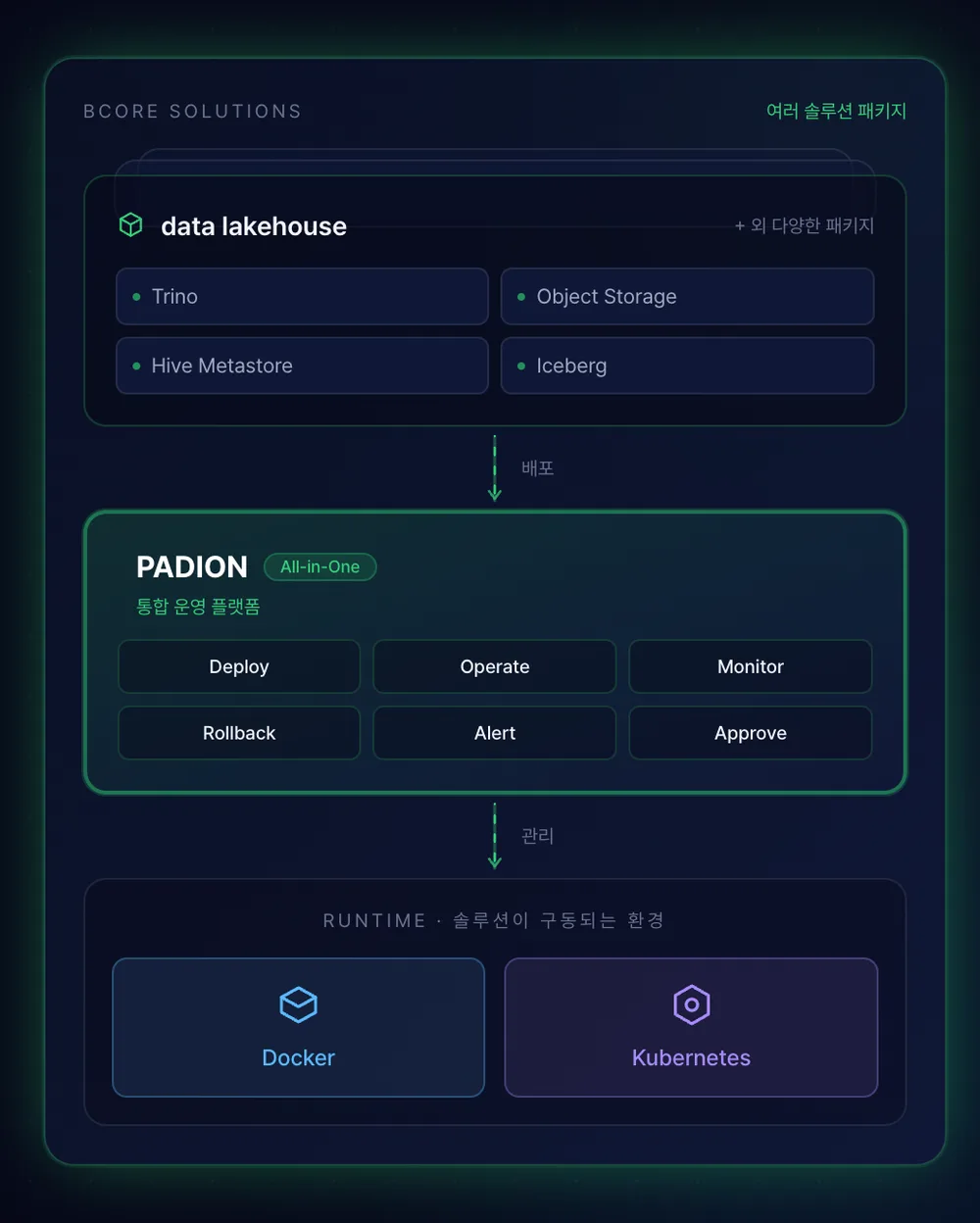
Install and operate, all with PADION
As container infrastructure grows, operations get heavier. Every environment connects differently, and a single deploy means juggling commands and YAML. Work piles up on the few who know operations, and you only learn about failures by opening a terminal.
Install & operate
Install solutions as a Package, in one go
If you need the environment first, compose the solutions you need as a verified Package and install in one go. No need to pick components or match versions yourself — operations and management continue on the same screen.
Connect & operate
Connect existing Docker · Kubernetes as-is
Bring scattered Docker · Kubernetes clusters into one screen and handle everything from deploy to config changes via GUI. Clicks instead of commands — the screen tells you about failures before you open a terminal.
Whether you install fresh or connect what you run — operations are the same, in one PADION screen.
The solutions you need, as a single Package
Standing up a single solution — picking components, matching versions, wiring them together — is a project in itself. BCORE delivers the finished result as a Package. Deploy it on your Docker · Kubernetes environment and the solution comes up as composed.
Inside a Package
Bundled so you just receive and deploy
- Solution components
- Versions · compatibility
- Integration settings
- Operations console
Example — data lakehouse (data platform Package): Trino · Object Storage · Hive Metastore · analyze
Supported environments
Docker Released
Operate container workloads on a Swarm cluster. Key resources: Swarm · Stack · Service · Container · Network · Volume · Registry.
Kubernetes In progress
Manage cluster resources via GUI. Key resources: Workload · Service · Ingress · Job · CronJob · ConfigMap · Secret · PVC.
How it works
One Package, identical on Docker or Kubernetes
BCORE composes and integrates the solutions you need into one Package. That Package reproduces identically — same composition, same versions — on Docker or Kubernetes, so results don't drift by environment.
Management port — Define
- · Define components (Docker = container, K8s = workload template)
- · Bundle components into a Package and pin versions
- · Track change history · deployment history
Operations console — Deploy & Operate
- · Install as-is on your environment (Docker · K8s)
- · Reproduce the same composition across clusters
- · Upgrade to a standard version in one go
An entire app, as one Stack
PADION handles the many resources that make up an app as a single Stack. Even where workloads · services · configs · secrets are split across separate YAMLs, it defines scattered resources as one Stack and handles deploy · update · delete in one action. The Stack is PADION's basic unit of operation.
Define by screen, not YAML
Compose workloads · services · configs as forms instead of writing each by hand. The console generates and applies the manifests.
Per-Stack, in one action
Deploy · update · delete are handled per Stack, so the whole app moves together without chasing scattered resources.
Kubernetes strengths intact
Fine-grained workload types, Ingress routing, declarative self-healing and large-scale scaling stay exactly as they are.
One Stack = one application — every resource of the app (Workload · Service · Ingress · ConfigMap · Secret · PVC) bundled as one unit.
Scattered clusters, operated from one screen
Newly installed solutions or already-running Docker · Kubernetes — operations happen the same way, on this screen. No connecting to each cluster or memorizing commands; from status checks to deploy · edit and incident response, by click.
Unified View
Clusters in one console
Switch and manage scattered Docker · K8s clusters from one screen.
Real-time server status
Resource usage · status in one view, down to usage graphs and container logs.
Configuration at a glance
See which workloads · configs are deployed, exactly as they are now.
Operate
Deploy from the screen
From workload deploy to service · network config, enter and apply on screen.
Define service order
Set precedence to define start order. Define finer multi-step order when needed.
Manage container images
Connect internal · external registries to browse and tidy images safely.
Govern
Instant failure alerts
When a container or service stops, see it on screen without refreshing.
Config history · instant rollback
Record and compare changes, and roll back to a prior state in one action.
Full activity audit
Who · when · what — captured fully, tracked alongside system events.
How the operations load drops
Operations once spread across tools converge into one console in PADION. Docker Swarm or Kubernetes — the same.
| Operating it yourself | Operating with PADION |
|---|---|
| Tools all over the place — host access · images · deploy · monitoring across different tools. | In one console. Configs and Secrets bundled into the Stack and deployed in one go. |
| People step in for trouble — node scaling · restarts · resource rebalancing by hand. | Specify the desired count and Docker · K8s keep that state — restarting on failure automatically. |
| An upgrade is a big risk — swapping one component can take down the whole service. | Only the changed parts swap quietly. Docker updates changed services; K8s updates by Release. |
| Hard to find what broke — scattered logs · dashboards eat time on root-cause. | All status on one console screen. Real-time alerts when something breaks. |
| Hard to recreate the same environment — "it worked here" repeats. | Re-apply one Stack definition and the same environment reproduces exactly. |
What the ops team minds shrinks from dozens of hosts · configs to a few Stacks.
Stronger when PADION binds them
PADION Operations Platform operates the infrastructure the other PADION products run on. Products you used separately bind into one auth · policy · control fabric.
| Product | Standalone | What PADION adds in operations |
|---|---|---|
| gatekeeperAuth | Operator login · MFA · sessions | Delegates the same session for console entry without re-login. Every action ties to the auth audit log. |
| datakeeperAccess control | Trino policy-based access control | datakeeper governs data access; PADION deploys · operates · monitors the datakeeper containers from the console. |
| data lakehouseStorage | Data ingestion · warehouse | Installs · scales · monitors lakehouse containers and storage (PVC · Volume) from the console. |
| EoHTransform · load | Workflow-based ETL execution | Monitors ETL job (Job · CronJob) status from the console and re-runs failed jobs on the spot. |
| analyzeAnalytics | Python-container analytics | Manages analytics-container creation · resource allocation · status from the console, with alerts on usage spikes. |
Tech Spec
| Orchestration | ReleasedDocker Swarm In progressKubernetes |
|---|---|
| Managed resources | Workload · network · storage · config/secret · namespace (form-based create · edit · delete) |
| Monitoring | Resource dashboards · time-series graphs · Pod / service log viewer |
| Real-time alerts | SSE-based container · service failure / event alerts |
| Image registry | Private registry · catalog browse · tag management |
| Audit · history | Request history · system events · config version control / rollback |
| Deployment | On-premises install (BCORE Package) |
| PADION integration | data lakehouse(Storage) · gatekeeper(Auth) · datakeeper(Authz) · EoH(ETL) · analyze(Analytics) |
| Recommended environment | Sizing by scale / workload determined during deployment consulting |
Where it sits in the flow
The Operations Platform is the operations layer on which every stage of the data flow runs as containers.
Operations Platform → dnsd → gatekeeper → datakeeper → EoH → data lakehouse → analyze
Complex install and operations —
PADION is with you.
Verified Package install · multi-cluster operations · deployment consulting — start with a single meeting.
Weekdays 10:00 – 19:00 · info@bcore.co.kr